Your phone counts the reps, so you do not have to
Put the phone down low, step back until your whole body is in view, and move. The front camera follows your movement and counts each rep on the phone itself.
Pay once, from €29 for 3 months.
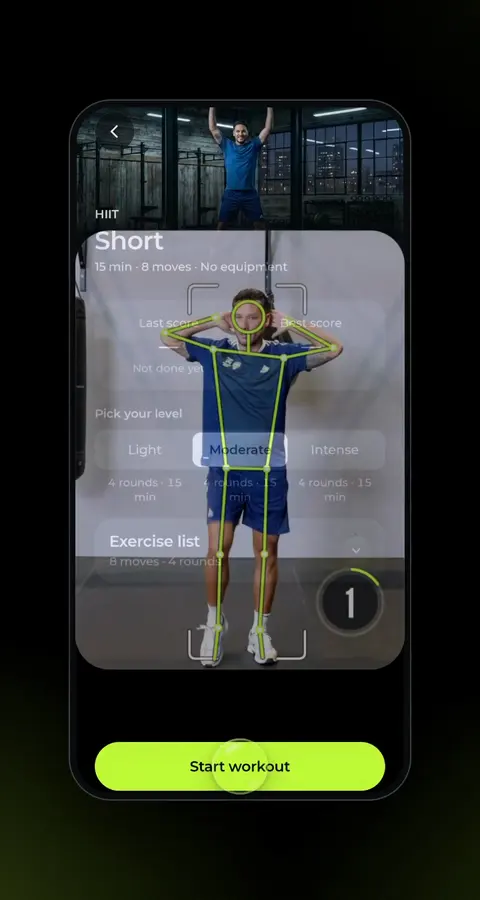
A recording from the app itself.
How it works
Place the phone low
On the floor or a low surface, below hip height. Tilt it if there is a lot of space above your head, and check the light. Short slides show this before a session.
Step into view
When your whole body is in view a 5-second countdown starts. Stepping out of view resets it.
Move, and the count goes up
A rep move ends when the camera has counted your target. A timed move ends when the timer runs out. A recorded coach voice counts along.
See your score
The recap shows your total score, reps and time, each compared with your last completed run. The first time you get a baseline.
Screen and button names are written as they appear in the English version of the app.
Good to know
- Guided workouts have 3 levels: Light, Moderate and Intense.
- Your score is the number of counted reps times a points value per rep, 10 by default.
- If you leave the frame for about 5 seconds, a large camera view shows how to step back in.
- In a workout from your plan the camera is optional: tap Count my reps to turn it on.
What it does not do
Reps the camera missed cannot be added afterwards, and there is no pause button in a guided workout from the Explore tab. A rep move does not end by itself when the camera does not count: use Skip exercise.
What research says
In a validation study, pose estimation from a phone camera measured hip, knee and ankle angles during jumps to within a few degrees of a laboratory motion-capture system.
A small study of one kind of movement, filmed from the side. Fast or twisting movements are measured less reliably, and it tested the technology in general, not the rep counting in this app.
Barzyk et al., 2024, European Journal of Sport ScienceModerate evidence
Questions
Does the camera record video?
No. The camera is used to count your reps while you move. Nothing is recorded.
Can I train without the camera?
Yes. Guided and custom workouts offer Continue without camera: every rep move becomes a timed move and you follow the video. Nothing is counted then, so the score is 0. The weekly challenge and a 28-day exercise challenge do need the camera, because their result is the rep count.
The camera does not see me. What helps?
Put the phone lower, below hip height, step back until your whole body is in view, and make sure there is enough light. If there is a lot of room above your head, tilt the phone.
When does a workout count toward my week?
A guided or custom workout counts when at least 1 rep was counted or it lasted 5 minutes or more. A workout from your plan counts after the first finished move or 60 seconds of exercise time.
More in Workouts
- Workout BuilderPut together your own workout from a searchable list of exercises, timed or in reps.
- GymGym days planned around your week, with routines, set logging and a suggestion for the next weight.
- WalkingA walking loop from where you are, by distance or by time, and a daily step goal from your health app.
- All six parts of the app
Choose 3, 6 or 12 months
From €29. Pay once, no subscription. You pay here on the website, then sign in to the app with the same email address. Rather look first? Download the app